
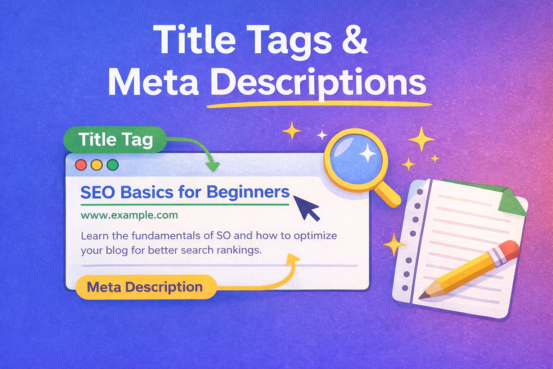
Title Tags and Meta Descriptions:
If you’ve ever searched something on Google and clicked a result just because the title looked interesting, you’ve already seen the power ofTitle Tags and Meta Descriptions in action.
These two small elements may look minor, but they play a huge role in SEO, click-through rate (CTR), and user trust. In this guide, we’ll explain what they are, why they matter, and how to write them the right way—without any technical confusion.
What Are Title Tags?
A title tag is the clickable headline that appears in Google search results and browser tabs.
Example of a Title Tag:
How to Write SEO-Friendly Blog Posts (Beginner Guide)
Where Title Tags Appear:
- Google search results
- Browser tabs
- Social media previews (sometimes)
Why Title Tags Matter for SEO:
- They tell Google what your page is about
- They help users decide whether to click your link
- They directly affect your search rankings and traffic
In simple words, a good title tag = more clicks.
How to Write a Good SEO Title Tag
Here are some easy rules to follow:
Keep it short and clear
- Ideal length: 50–60 characters
Include your main keyword
- Place it naturally, preferably near the beginning
Make it human and attractive
- Write for people, not just search engines
Avoid keyword stuffing
❌ Bad: SEO Guide SEO Tips SEO Blog SEO
✅ Good: Simple SEO Guide for New Bloggers
Example:
Good Title Tag:
Title Tags and Meta Descriptions: Simple SEO Guide
What Are Meta Descriptions?
A meta description is the short summary that appears below the title in Google search results.
Example of a Meta Description:
Learn what title tags and meta descriptions are, why they matter for SEO, and how to write them in a simple and effective way.
Important Note:
Meta descriptions do not directly affect rankings, but they greatly influence clicks.
Why Meta Descriptions Are Important
Even if your page ranks well, people won’t click unless the description looks useful.
Meta descriptions help by:
- Explaining what your content is about
- Building trust with readers
- Improving click-through rate (CTR)
- Supporting SEO indirectly
Think of it as a mini-advertisement for your blog post.
How to Write an SEO-Friendly Meta Description
Follow these simple tips:
✅ Keep it between 140–160 characters
Long descriptions may get cut off.
✅ Use your main keyword naturally
This helps Google highlight it in bold.
✅ Write like a human
Make it sound helpful, not robotic.
✅ Add a soft call-to-action
Examples:
- Learn more
- Read the guide
- Step-by-step explanation
Example:
Good Meta Description:
This beginner-friendly guide explains title tags and meta descriptions, why they matter for SEO, and how to write them correctly.
Title Tags vs Meta Descriptions (Quick Comparison)
| Feature | Title Tag | Meta Description |
|---|---|---|
| Visible in search | Yes | Yes |
| Affects rankings | Yes | No (indirect) |
| Purpose | Ranking + clicks | Clicks |
| Length | 50–60 characters | 140–160 characters |
Common Mistakes to Avoid
❌ Writing the same title for every page
❌ Leaving meta descriptions empty
❌ Stuffing keywords unnaturally
❌ Writing titles only for Google, not users
❌ Using clickbait that doesn’t match content
Best Tools to Optimize Title Tags & Meta Descriptions
- Yoast SEO (WordPress)
- Rank Math
- Google Search Console
- Ahrefs / SEMrush
- ChatGPT (for idea drafting)
These tools help preview how your title and description will appear in search results.
Final Thoughts
Title tags and meta descriptions may be small, but they have a big impact on SEO and traffic. When written properly, they help search engines understand your content and encourage users to click your link.
Quick reminder:
✔ Keep titles clear and keyword-focused
✔ Write descriptions that sound human
✔ Match your content honestly
✔ Optimize every blog post
If you improve just these two elements, you’ll already be one step ahead in SEO.
[…] 1. Title Tags and Meta Descriptions […]
[…] Title Tags and Meta Descriptions […]